
About our service providers
Table of contents
As its name suggests, the Service Providers module enables you to manage service providers within the software.
It is important to differentiate between suppliers and service providers. Suppliers refer to the supply of goods or materials, such as car parts or timber, while service providers refer to the provision of services, such as concierge services or payroll management. Service providers also include insurance companies, banks, company cars, etc.
Depending on the company’s situation, it may be possible to manage everything via suppliers, but the Suppliers module can be very useful.
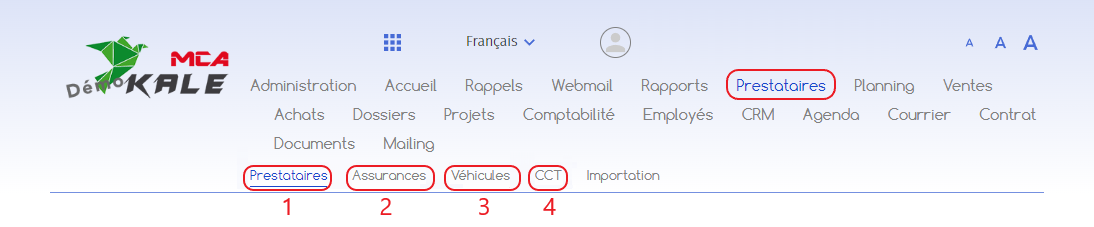
Types of service providers
Within the software, service providers are divided into different categories.
1. Service providers
The ‘Suppliers’ tab is used to manage various types of information depending on the company’s activity.
Let’s take the example of a plumbing fitter who works on a boiler. The installer must work in a building managed by a property management company, on behalf of a customer.
Within the software, customer details are managed in the “Customer” module.
As the management of a building may change over time, the address of the building can be used as a service provider so that the address is retained in the event of a change of management.
In this way, the building can be attached to the customer and the plumbing fitter always has the right information for his work.
2. Insurance
The “Insurance” tab lets you manage your various insurance contracts (accident insurance, health insurance, etc.). On average, a company manages 10 to 20 insurance policies.
3. Vehicles
The ‘vehicles’ tab lets you manage a fleet of vehicles.
In the case of a garage, for example, this tab will be used to list the vehicles that can be connected to customers. When creating an invoice or work report for a customer, it will be possible to select a vehicle linked to the customer.
If a company manages a fleet of company cars, these can be included in the pay slips. The software also calculates all the costs associated with a vehicle.
4. CLA
The ‘CLAs’ tab is used to manage the collective labour agreements (CLAs) that apply to the company.
As a CLA is linked to a particular profession, a company may be subject to several agreements, depending on the professions it carries out.
In the software, the CLAs are linked to the HR module, and govern weekly working hours, holidays, the number of days holiday according to age, overtime, etc.
Other uses
The Suppliers module can also be used for rooms, such as conference rooms or offices, to manage availability.